Atlassian MCP server setup and consulting in Singapore and California.
Information Officer is a certified Atlassian Solution Partner that helps organisations in Singapore and California configure and adopt the Atlassian Remote MCP Server. The Atlassian MCP server (mcp.atlassian.com) is a cloud-hosted Model Context Protocol server that connects AI assistants — including Claude, ChatGPT, Cursor, and VS Code — directly to your Jira, Confluence, and Bitbucket Cloud workspace.
With Atlassian MCP configured, your teams can create Jira issues, search Confluence documentation, review pull requests, and debug Bitbucket Pipelines failures — all using natural language, without leaving their AI tool of choice.
What Atlassian MCP enables
The Atlassian MCP server connects your AI assistant to your real Atlassian data — so responses are grounded in your actual projects, issues, documentation, and code, not generic knowledge.

Jira from your AI assistant
Create and update Jira issues, generate tickets from meeting notes or specs, search and summarise your backlog — all from Claude, ChatGPT, or Cursor, without opening Jira.

Confluence knowledge search
Search and summarise Confluence pages, create and update documentation with AI assistance, and get answers grounded in your organisation's actual knowledge base.

Bitbucket workflow automation
Review pull requests, create PRs, leave comments, analyse pipeline failures, and monitor deployments — via your AI assistant, directly from your IDE.
Works with any MCP client
Claude, ChatGPT, Cursor, VS Code, GitHub Copilot CLI, Google Gemini, and Amazon Q — any MCP-compatible AI tool your teams already use.
What Information Officer delivers
From initial MCP configuration through to team adoption and governance — we make sure your Atlassian MCP setup works correctly, securely, and delivers lasting value for your teams.
MCP Setup & Configuration
Connect your Atlassian Cloud workspace to the Atlassian Remote MCP Server, configure OAuth 2.1 authentication, set up Bitbucket API token scopes, and validate connectivity across your chosen AI clients.
Governance & Access Control
Define which tools and data sources each team or role can access via MCP, implement least-privilege token scoping for Bitbucket, and establish acceptable use policies for AI-assisted Atlassian workflows.
Team Enablement
Train your developers, project managers, and IT teams to use their preferred AI assistant with Atlassian tools — covering best practices, prompt patterns for common workflows, and what to do when things go wrong.
Put your AI assistant to work with Atlassian
Our certified Atlassian consultants in Singapore and California will configure the Atlassian MCP server for your workspace and help your teams get real value from AI-assisted Jira, Confluence, and Bitbucket workflows.
How Atlassian MCP works
The Atlassian Remote MCP Server connects in four steps — and Information Officer handles the setup, testing, and governance so your team can start using it immediately.
- 1
Connect
Point your MCP client (Claude, Cursor, VS Code, etc.) to the Atlassian MCP endpoint. For Jira and Confluence, this triggers an OAuth 2.1 browser-based authorisation flow using your existing Atlassian Cloud account. For Bitbucket Cloud, configure an API token with the appropriate scopes.
- 2
Authorise
Grant access to the Atlassian products you want your AI client to interact with — Jira, Confluence, Bitbucket Cloud, or Compass. Permissions respect your existing Atlassian access controls — the AI can only see and do what your account is already permitted to.
- 3
Use
Your AI assistant can now query, create, and update content across your Atlassian workspace using natural language prompts. Ask Claude to summarise a Jira sprint, ask Cursor to create a PR comment, ask ChatGPT to find the relevant Confluence runbook — the MCP connection makes it all possible.
- 4
Govern
Establish team guidelines, token scope policies, and acceptable use frameworks to ensure AI interacts with your Atlassian data safely and consistently — especially important for write operations such as issue creation and PR commenting.
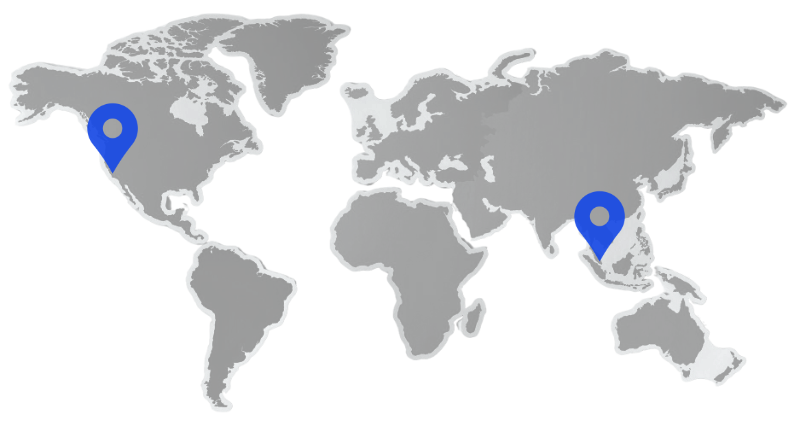
Our Offices
We maintain a strong global presence with offices in California, New York, and Singapore, enabling us to deliver seamless, localised support and strategic solutions across key markets.

Singapore
Information Officer Pte Ltd
1002 Jalan Bukit Merah #06-19
Singapore 159456
+65 8086 7376 (WhatsApp)
San Fransisco, California
Information Officer LLC
PO Box 5021
Berkeley, California 94705, USA
+1 (212) 913-0469
Trusted by businesses around the world








Our technology partners








Frequently asked questions
What is the Atlassian MCP server?
The Atlassian Remote MCP Server (mcp.atlassian.com) is a cloud-hosted Model Context Protocol server that acts as a bridge between your Atlassian Cloud workspace and any MCP-compatible AI client. It lets AI assistants such as Claude, ChatGPT, Cursor, VS Code, and GitHub Copilot interact directly with Jira, Confluence, Bitbucket Cloud, and Compass — so your teams can create issues, search documentation, review pull requests, and manage workflows using natural language in their AI tool of choice.
Which Atlassian products does the MCP server support?
The Atlassian Remote MCP Server currently supports Jira, Confluence, Compass, and Bitbucket Cloud. Through the MCP connection, AI clients can search and summarise Jira issues, create and update Confluence pages, manage pull requests and debug pipelines in Bitbucket, and query service data in Compass.
Which AI clients work with the Atlassian MCP server?
The Atlassian Remote MCP Server is compatible with any MCP-compliant client, including Claude (Anthropic), ChatGPT (OpenAI), Cursor, VS Code (with MCP extensions), GitHub Copilot CLI, Google Gemini, Amazon Q, and Docker. It also works with local MCP-compatible clients running on localhost.
What is the difference between Atlassian MCP and Atlassian Rovo?
Atlassian Rovo is Atlassian's own AI product — it includes Rovo Search, Rovo Chat, and Rovo Agents, all operating within the Atlassian Cloud interface. The Atlassian MCP Server is a protocol bridge that lets external AI clients (such as Claude or Cursor) access Atlassian data from outside the Atlassian platform. They serve different purposes: Rovo is for AI-powered productivity within Atlassian; MCP is for integrating Atlassian into the AI tools your teams already use outside of Atlassian.
Is the Atlassian MCP server secure?
Yes. The Atlassian Remote MCP Server uses OAuth 2.1 for authentication, connecting to your existing Atlassian Cloud account and respecting the permissions and access controls already configured in your workspace. For Bitbucket Cloud, API token authentication is used with configurable scopes that limit what actions an AI client can take. As part of MCP setup, we help organisations define access policies, scope tokens appropriately, and establish acceptable use guidelines.
Do I need a Rovo licence to use the Atlassian MCP server?
For Jira and Confluence, access via the Atlassian MCP Server requires a Rovo licence on your Atlassian Cloud plan. For Bitbucket Cloud, MCP access does not require Rovo — it uses API token authentication against your existing Bitbucket Cloud workspace. Licence requirements may change as Atlassian continues to develop the MCP offering.
What can I actually do with Atlassian MCP in practice?
Practical use cases include: developers asking Claude or Cursor to create Jira issues from a requirements document, engineers debugging a Bitbucket Pipelines failure by asking their AI assistant to analyse the error log, project managers getting a Jira sprint status summary without leaving their chat tool, and content teams drafting Confluence documentation grounded in existing pages. The MCP connection means AI responses are based on your actual Atlassian data — not generic knowledge.
Can Information Officer help us set up and adopt Atlassian MCP?
Yes. As a certified Atlassian Solution Partner, Information Officer helps organisations in Singapore and California configure the Atlassian Remote MCP Server, connect their preferred AI clients, set up appropriate access controls and token scoping, and build the internal playbooks and training their teams need to get consistent value from AI-assisted Atlassian workflows.
Your Atlassian MCP partner in Singapore & California
From first-time MCP setup to organisation-wide adoption and governance — our certified Atlassian consultants are ready to help your teams get the most from AI-assisted Atlassian workflows.